AI Motion Graphics With Music: From 6 Seconds to 15 Minutes
A moving video stops the scroll better than a still image, but making motion graphics takes software and skill. In AI Studio you write what the video should say, and it makes a video of moving words and shapes in your brand colours, with music and sound effects, ready to save and post.
10 seconds in story size, with “Upbeat” music and sound effects as the words come in. Watch with sound
Pick the length and the size
| Length | Good for |
|---|---|
| 6, 10 and 15 seconds | Stories, quick ads, an offer or a product |
| 30 seconds and 1 minute | Reels and TikToks that explain an offer or steps |
| 2 to 15 minutes | A company introduction, a service explained, an animated presentation |
There are four sizes: story 9:16, portrait 4:5, square 1:1 and landscape 16:9 for YouTube and presentations.
Long videos: chapters from your words
For a video longer than a minute, write your points or paste your whole script (up to 3,000 characters). The studio writes the video’s plan first, then each chapter’s scenes, laid out with ready-made scene types: an opener, a statement, a list, steps, a comparison, a number, a question, and a closing card with your call to action.
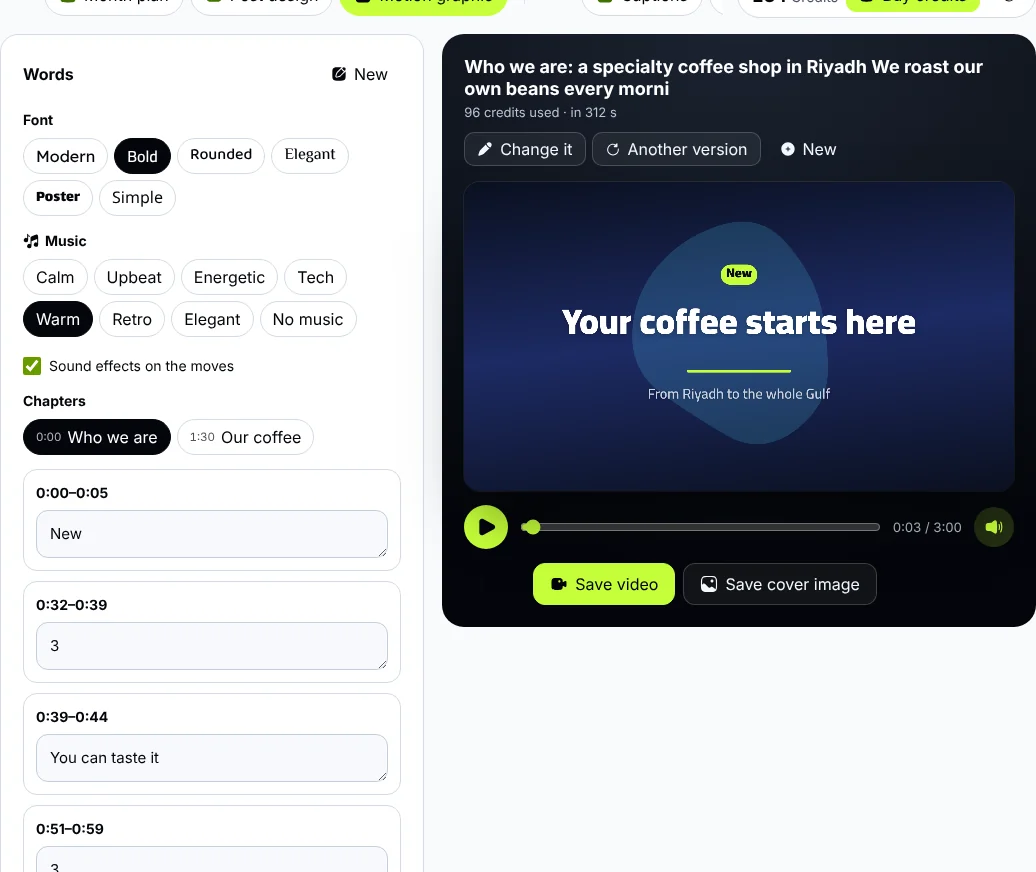
A long video in the player: chapters to jump between, the music, and each chapter’s words to edit.
- Jump between chapters from the chapter list, and edit each chapter’s words on its own.
- A long video takes longer to make, and the studio tells you about how long. You can leave the page; it carries on when you come back.
The first 20 seconds of a long video: an opener, a statement and a list, with “Warm” music and a sound on each scene. Watch with sound
Sound: music and effects
- Background music in seven moods: calm, upbeat, energetic, tech, warm, retro and elegant. The studio picks the one that fits your video; change it with a tap, or choose “No music”.
- Sound effects on the moves: a soft sound as words come in, a whoosh between scenes and a chime on the call to action. Turn them off with “Sound effects on the moves”.
- Original music: the studio makes it note by note in your browser, so it needs no licence and nobody can claim it.
- The speaker button in the player mutes or plays the sound, and if Zyadat Radio is playing, it pauses when the video’s sound starts.
Save the video
- Save video: the studio records the video with its sound in real time, so keep the page open until it finishes. It saves as MP4 in most current browsers; if it saves as WebM, open the studio in Chrome or Safari to save MP4 for Instagram and TikTok.
- Save cover image: any moment of the video as a picture, for your reel’s cover.
Tips for motion that holds attention
- Put the most important idea in the first second and a half; that decides whether people keep watching.
- Few words on each screen: the video is read while it moves.
- End with a clear call to action and your brand name.
- Many people watch without sound, so the studio writes videos that make sense silently, and the music brings them to life for those who listen.
Make your first motion graphic in AI Studio.