AI voice-over for your videos: Arabic and English voices you hear before you pick
A video with a voice gets its message across faster and holds viewers who don't read along. In AI Studio you can add a voice-over to a motion graphic, and the same voices speak for the presenter of an ad video. You pick the voice by ear, and the studio writes the lines and times them to the video.
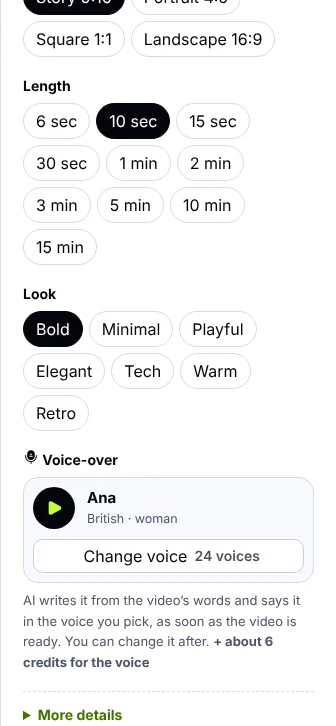
In the motion graphic form: the voice picked, ▶ to hear it, and “Change voice”.
Pick the voice by ear
- Press “Change voice”: every voice for the video's language appears, its own language first, with how many there are.
- Men or women: filter the list in one tap, and search by name or accent when there are many.
- Listen first: press ▶ on any voice to hear a short line; one plays at a time.
- No voice: if you want the video with music only, choose “No voice”.
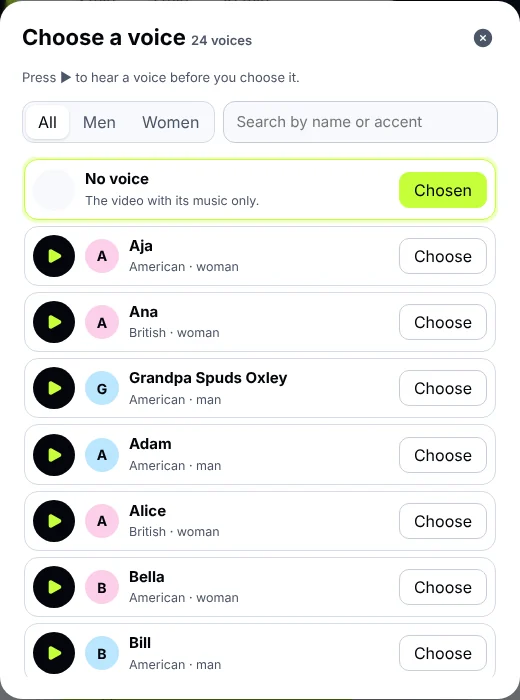
Every voice for the video's language, men and women, with ▶ for each.
How the voice-over is written and made
- As soon as the video is ready, Claude writes the voice-over's lines from the video's own words, each at its scene's moment.
- The voice you picked reads them, and the music steps down while a line is spoken and comes back after.
- You can change any line, delete it, or add one at a moment of the video, then make the voice-over again. Lines that didn't change aren't made or charged again.
- “Save video” keeps the voice in the video with the music.
Accent and language
Pick the video's language in the form: Gulf Arabic, Standard Arabic, Egyptian, English, or Arabic with English. The voices for that language come first, including Saudi, Gulf, Egyptian and Levantine accents, and voices that speak both Arabic and English.
The price
A voice-over is counted by the characters spoken, and its price is on the button with the video's before you start. A 30 second voice-over usually costs about 19 credits with its lines written, and lines said before in the same voice aren't charged again.
Tips for a clearer voice
- Short, simple lines: a line spoken in two or three seconds is clearer than a long one.
- Numbers and prices: write them the way you want them said, like “twenty percent off”.
- Match the voice to your audience: a calm voice for luxury products, an upbeat one for offers.
- Listen to the whole video before saving, and shorten a line that runs past its time; the studio points it out.
Common questions
Does it sound natural in Arabic?
Yes, the voices are made to speak Arabic naturally, including Gulf and Saudi accents.
Can I use my own voice?
Not at the moment; you pick from the studio's voices.
Does it work for ads?
Yes, the same voices speak for the presenter of an ad video.
Try it now
Open Motion graphics in AI Studio, pick a voice and hear it before you start.